
How can we help you?
Find answers about downloading, memberships, payments, updates and more.
Downloading
Everything related to downloads, links, updates and file access.
RULES
This is a learning platform, not a place for leeching.
- Downloading streamed media directly from the website is strictly prohibited. If someone ignores this rule, account access may be removed immediately.
- You can download only through the download options provided on the site, such as MEGA or other approved course links.
- WATCH, LEARN, TAKE ACTION, CHANGE YOUR LIFE !
How to use our Download/Course links?
EACH COURSE CAN BE DOWNLOADED
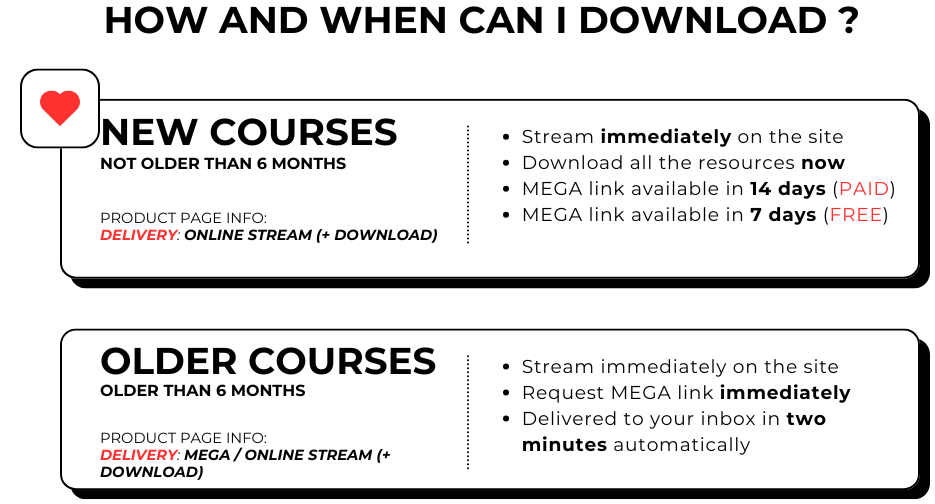
There are 2 options you can see on the site:
- Online Stream (+ Download)
- MEGA
1. ONLINE STREAM (+ Download)
You can watch these courses immediately and directly on our website. Videos are organized into sections based on the course structure; if a section does not contain a video, it is skipped.
Also, you can download all documents (templates, PDFs, Excel files, etc.) to your computer - tab "MATERIALS".
Download Link for the entire course with One Click:
Each course offers (check the latest lesson) the option to request a download link, which will be sent to your registered email within 24 hours. The request button is always located at the end of the course.
Restrictions:
For purchased courses, you can request the download link 14 days after purchase.
For courses available to members (membership), you can request it after 7 days.
This delay ensures I have enough time to upload everything to the cloud.
The download link will be valid for 7 days from the time it’s sent to your email. The hosting service used is MEGA.
Also, all links have 7 days of expiration.
THIS APPLIES ONLY ON COURSES NOT OLDER THAN 6 MONTHS. OLDER ONES HAVE IMMEDIATE ACCESS TO THE DOWNLOAD LINK.
Need the download link sooner? Immediate Download Access
Don't want to wait 14 days after purchase? For a small extra fee, you can add Immediate Download Access to the course in your cart or at checkout and request the download link right after your payment.
- Available for purchased courses that are between 14 days and 6 months old. Newer courses are still being uploaded, older ones have immediate access anyway. It is not available for membership courses.
- The Download Link row on each product page shows whether the course qualifies and the exact price.
- After payment, go to My Account → Immediate Downloads and click REQUEST DOWNLOAD LINK. The download link will be sent to your email.
2. MEGA
You can use it for watching and downloading. 3rd party service.
Watch the video below (for those who have their own account):
How do I download the product/course?
1.PAID COURSES
A) Mega links are sent automatically by the system to the email address registered with your account here.
You can request a Mega link either in the Online Stream section — please check the latest lesson.
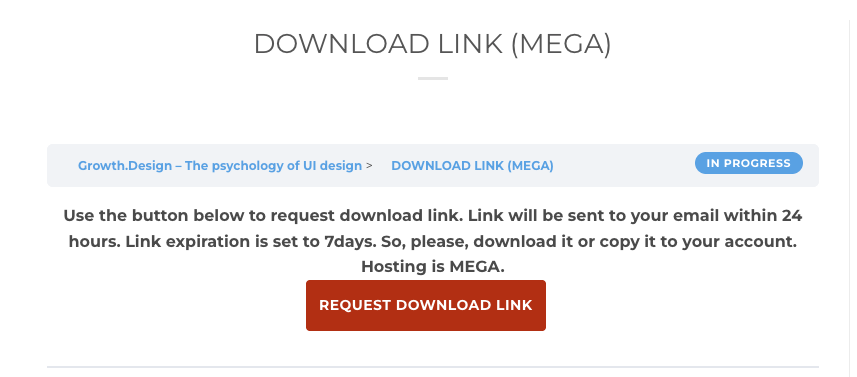
B) Or, if it is an older course and does not have an Online Stream section, go to your account and open the My Purchases tab.

2.FREE COURSES (MEMBERSHIP)
A) Same as A) for PAID COURSES
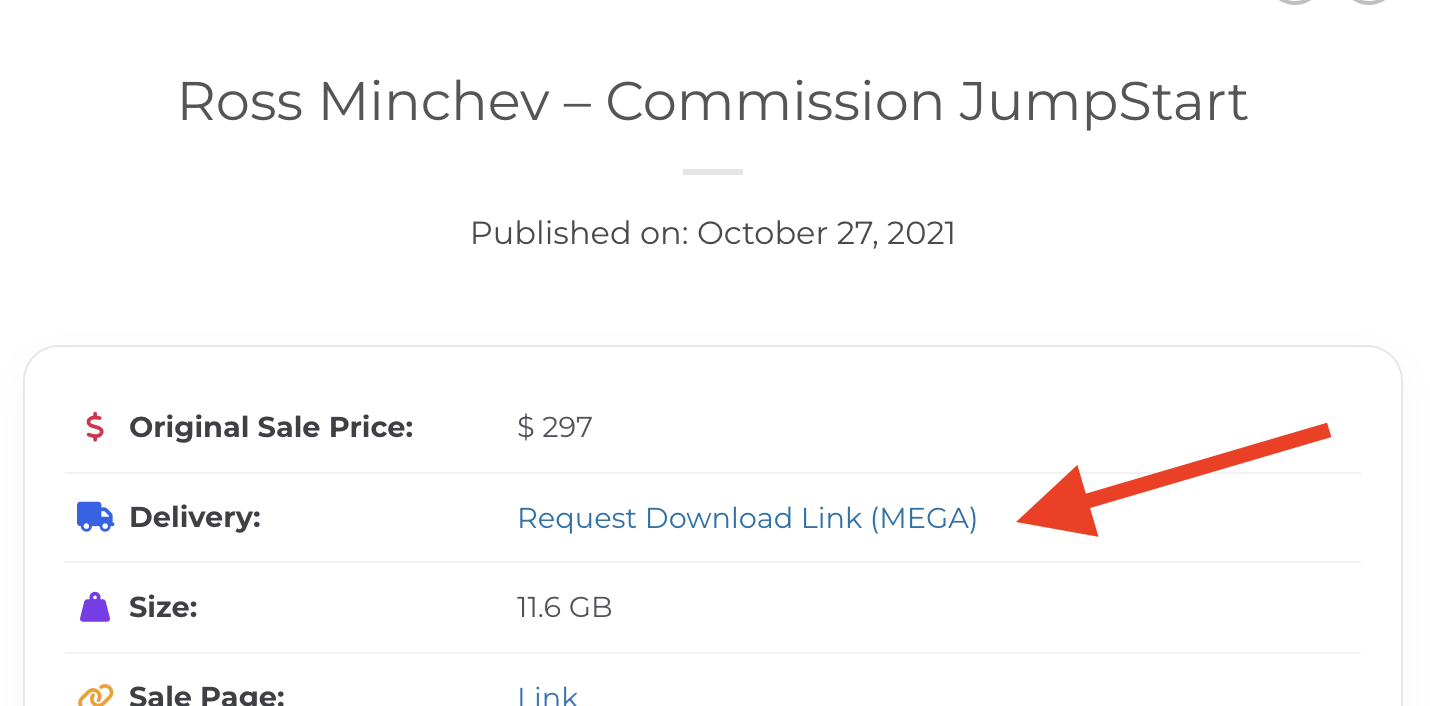
B) Or, if it is an older course and does not have an Online Stream section, go to the product page and click: “Request Download Link (MEGA)”.
Can I copy the content instead of downloading it?
Yes — copying the content to your own MEGA account is absolutely possible, and in many cases it is even the better option.
Immediate Downloads - How to access them
Immediate Download Access is an optional add-on for purchased courses that are between 14 days and 6 months old. Add it in your cart or at checkout and you can request the download link right after your payment, without waiting 14 days.
To get your link, open My Account → Immediate Downloads (or click the button in the email you received after the purchase) and click REQUEST DOWNLOAD LINK next to your course. The download link will be sent to your email.
Are there any limits?
Yes, there are.
To prevent the system from being overloaded or flooded with requests, the limits are as follows:
Each course can be requested twice. This request count can be reset for you at any time if needed.
There are also daily limits across the entire website:
New Courses (Online Stream): 4 requests per day
Older Courses (without Online Streaming, paid): 4 requests per day
Membership Courses: 5 requests per day
Can I watch the videos online?
Yes. If the course offers online streaming, you can watch the videos directly on the website without downloading them first.
If the course is updated, do I get these updates too?
Yes. If a course is updated, you keep access to the update.
Usually the same course link remains valid, and a new folder named UPDATE is added with only the newly added files.
You should also receive an email notification about the new update.
Are the downloads zipped and passworded?
No. Files are provided clean and without password protection.
Membership & Products
Questions about the difference between memberships and standalone products.
Membership vs. Products
If you buy a membership, you get access to roughly 3000 courses immediately — in practice, this means the products from the Free For Members category.
Membership does not include access to the Products For Sale category. Those courses have their own individual price and are sold separately.
If you only want to buy a standalone paid course, you do not need membership for that.
Payments
Information about payment methods, discounts, refunds and invoices.
How can I pay?
You can currently pay using:
- Credit/Debit Card
- Crypto — BTC, LTC, USDT
- PayPal — visible only to regular buyers
Just add the product to the cart and continue through checkout.
If you choose crypto, the system must receive the exact order amount. In practice, that means you may need to add network fees on top of the order amount so the final received amount matches the order correctly.
Discounts?
1. Bulk Discount
When purchasing multiple products, the discount is applied automatically:
- 2–3 products → 15% discount
- 4–5 products → 20% discount
- 6 or more → 25% discount
2. Lifetime Membership with Bulk Discount
If you have 3 or more products in the cart, you may see an upsell offer during checkout to buy Lifetime Membership for $69.
Important: do not add Lifetime Membership to the cart in advance. The discounted offer appears later during checkout.
Is the payment for membership recurring?
No. There is no recurring billing. You only pay when you decide to buy.
What about refunds?
There is no refund policy. Please buy only when you already know what you want and understand what you are purchasing.
Do you provide an invoice?
As the business is not set up as a registered company, invoices are not issued directly.
If you need one for accounting purposes, you can create it yourself free of charge using this tool:
https://invoice-generator.com/
You can use the business details available on the website and generate the invoice there.
Still need assistance?
If you cannot find the answer here, contact us directly by email, Telegram or website chat.